Docking Monitor and Daisy Chain Revolutionize Your Workspace
Monitors
Are you frustrated by the chaos of tangled cables and cluttered workspaces? Multiple devices and crisscrossing cords can turn any desk into a mess. But what if you could organize your devices and cables in a smarter, hassle-free way without relying on traditional cable management techniques? A Daisy Chain and Docking Monitor can easily do this.
What’s the Docking Monitor?
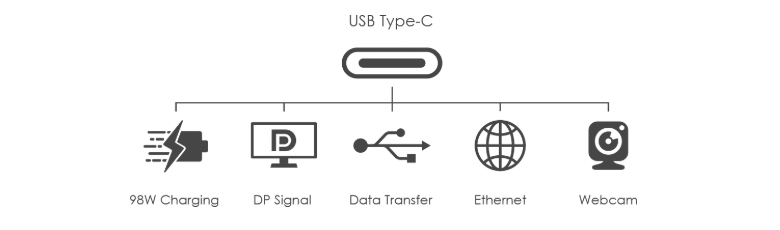
Nowadays, the monitor not only delivers a signal but can also do other things, like deliver power, transfer data, connect Ethernet, etc. But usually, we need a lot of cables to make all the functions work. Docking Monitor integrates all the features into a monitor. Therefore, you only need to manage a monitor and a cable and all the functions will work properly. Greatly decrease the cables needed and make it more convenient to work on.
What’s Daisy Chain and how to use it?
When setting up multiple monitors, the usual method involves connecting individual signal cables from each monitor to your devices. However, this process can present some challenges. You might find that the cables aren't long enough to reach comfortably, or the sheer number of cables can quickly lead to a cluttered and chaotic workspace.
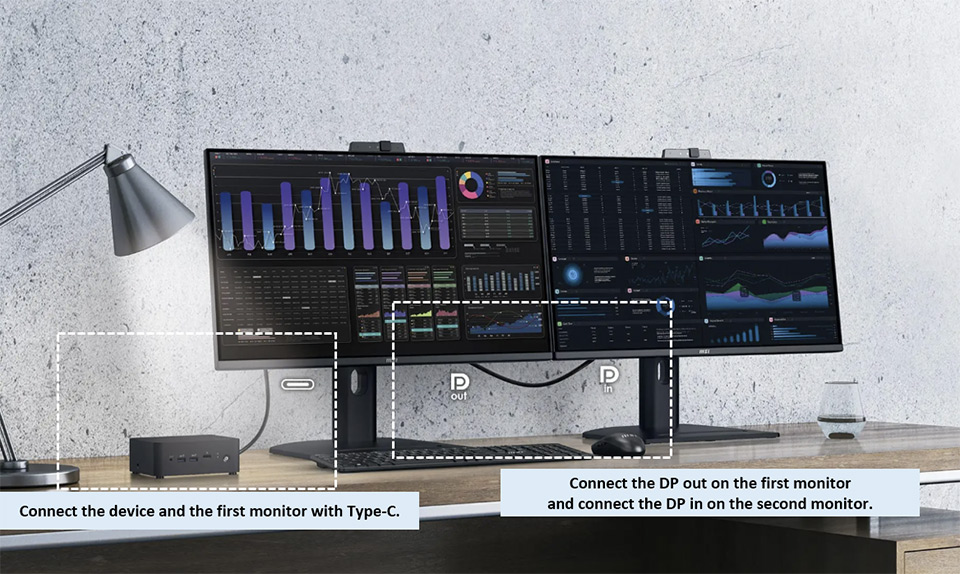
Daisy Chain can solve the problem. Daisy Chain allows monitors to connect in series, enabling you to extend or copy your image across multiple displays. Connect the device and the first monitor via Type-C, and connect DP out to the first monitor, and DP in to the second monitor. Daisy Chain reduces the number of cables running to your device, streamlining your workspace while maintaining high productivity.
Benefits of Docking Monitor and Daisy Chain Monitor
- Simplify cable management and maintain a clean, organized desk.
- Preserve the ports on your monitor for essential connections.
- Effortlessly connect multiple displays to boost productivity and efficiency.
- Solve the problem of cables being too short when connecting a second monitor
PRO MP275QPDG Liberates your workplace
PRO MP275QPDG is designed as a Docking Monitor and supports Daisy Chain. It supports power delivery, data transfer, Ethernet, and a built-in webcam.
PRO MP275QPDG is equipped with Type-C with PD Charging up to 98W. Only one USB Type-C cable can deliver signal and charge the device. Originally, two cables were required, one for signal and another for power, but now just one cable can handle it all.
Build in Webcam:
PRO MP275QPDG builds in a Webcam on top of it. So you don’t need to connect external Webcam. Once you connect Type-C to your device, the built-in Webcam will work. Originally, one cables were required, but now it’s zero.
KVM:
PRO MP275QPDG has KVM Switch function. KVM allows you to use the same keyboard and mouse between two devices. No need to use another keyboard and mouse to control another device.

Daisy Chain:
As we introduce above Daisy Chain allows monitors to connect in series, enabling you to extend your image across multiple displays. Connect the device and the first PRO MP275QPDG via Type-C, and connect DP out to the PRO MP275QPDG, and DP in to the second PRO MP275QPDG. Daisy Chain allows you to easily fulfill multiple displays. Expand your workplace, enhancing the workflow and efficiency.
Notes: PRO MP275QPDG supports up to two monitors for Daisy Chain.
Support Ethernet and Data Transfer
If your devices don’t have a LAN port, you still can connect to Ethernet on PRO MP275QPDG. It has a LAN port. Connect the device with Type-C and connect the LAN on your PRO MP275QPDG. This setup lets you enjoy fast Ethernet connectivity directly on your device. Also, Type-C supports data transfer too. Connect your storage drives to the monitor directly. Type-C lets you transfer the data between the device and your storage drives.
Support Mountable Stand:
PRO MP275QPDG’s stand can mount with your mini-PC. Place the device on the back of the stand further frees up desktop space.
The features of Productivity
PRO MP275QPDG is suitable for those who do multiple tasks. MSI adds more features to help you with productivity and protect your health at the same time.
PIP/PBP:
Picture-in-Picture (PIP) lets you overlay a smaller window within your main screen, perfect for multitasking without interrupting your main work. Picture-by-Picture (PBP) splits your screen into two distinct sections, allowing you to display content from two different sources side-by-side.
MSI Eye Care and Ergonomics :
PRO MP275QPDG is designed with user comfort and health in mind. Certified with Anti-Flicker and Less Blue Light technology, it minimizes eye strain while ensuring the original colors of images are preserved. This makes it ideal for extended work sessions without compromising visual quality.
Additionally, the monitor features a 4-way adjustable stand, allowing users to adjust the height, tilt, swivel, and pivot of the screen to find the most ergonomic viewing angle. Combined with G-sensor technology, the monitor seamlessly adapts to every movement by automatically adjusting the screen's orientation. This flexibility helps promote better posture, reduce physical strain, and create a comfortable working environment. By ensuring a proper working position, the PRO MP275QPDG not only enhances user health but also improves work efficiency.


