How to Set Up a QD-OLED Gaming Monitor on a Small Desk
Monitors
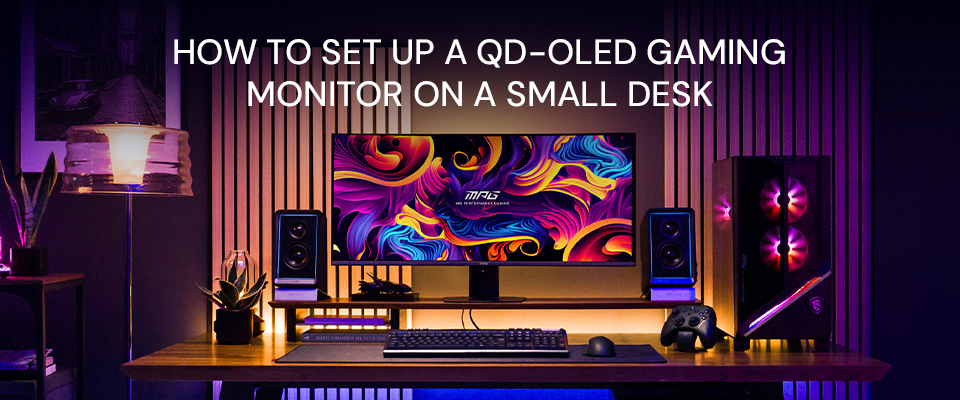
Intro: The Small Desk Dilemma — Big Display, Limited Space
For many gamers and professionals, a crisp, expansive QD-OLED visual experience is the dream. However, the reality is more often a cramped 60cm-deep desk, where an obtrusive monitor stand leaves little room for your keyboard, let alone a comfortable mousepad. This "Small Desk Dilemma" can often force users to choose between high-end visual performance and basic ergonomics.
Can you truly enjoy a flagship display in a tight space? The answer is yes — if you optimize your setup correctly. Before buying, it is crucial to understand how to choose a monitor size based on desk depth. For a deep dive into screen dimensions and panel types, check out our best monitor buying guide.
TL;DR: 3 Core Solutions for Small Desks
- Pick the Right Size: Select the 27- to 32-inch "sweet spot" or prioritize models with a compact footprint to balance screen real estate and desk depth.
- Use a Monitor Arm: Reclaim almost 100% of your desktop with full ergonomic flexibility and without permanent wall damage.
- Use a Wall Mount: This is the ultimate space-saver for ultra-shallow desks, but it requires wall drilling and fixing and reduces the flexibility for adjustments and positioning.
What Size OLED Monitor Actually Fits a Small Desk?
When desk depth is limited, both the screen size and the footprint of the stand are critical. Choosing a display with an optimized design can transform a cramped surface into an open and ergonomic high-performance setup. Creating a comfortable space that will encourage productivity, not hinder it.
The Space-Saving King: MPG 341CQR QD-OLED X36
Many assume that small desk spaces are restricted to small screens, but the MPG 341CQR QD-OLED X36 UWQHD 21:9 aspect ratio monitor proves otherwise. Its optimized Flat Base stand reclaims significant desktop real estate:
- A 62% smaller footprint: With a compact depth of only 228.3 mm, the redesigned base reduces the footprint by 62% compared to previous monitor generations.
- Sits Closer to the Wall: This stand allows the screen to sit just 17 cm from the wall, maximizing your viewing distance and reducing visual pressure.
- Functional Flat Base Surface: The completely flat base doubles as a stable storage area for your phone, keys, or other desktop accessories.
- Stability: The sturdy unified pedestal stand distributes the monitor weight evenly across the entire base, with a low center of gravity. Thus, the new design results in reduced screen wobble.
MSI's 27" and 32" QD-OLED Options
If you find the modern 16:9 widescreen TV format preferable, MSI’s 27‑inch and 32‑inch 4K QD‑OLED models remain the sweet spot for compact setups. These models also feature compact flat bases, instead of invasive Y-shaped legs, to maximize your usable desk depth.
- 27-inch 4K Models: Options like the MPG 272URX QD-OLED and MAG 272UP QD-OLED X24, provide incredible pixel density, ensuring crystal-clear visuals even when sitting at a close range.
- 32-inch 4K Models: Including the MPG 322UR QD-OLED X24 and MAG 321UP QD-OLED X24, these provide a premium large-screen experience. Equipped with DarkArmor and Uniform Luminance technology, they ensure minimal distractions and excellent image consistency.
When Should You Switch to a Monitor Arm or Wall Mount?
Many users often ask, "Which OLED monitor offers low-profile mount capabilities?" While MSI’s Flat Base stand is incredibly efficient, you can further maximize your setup using VESA-compatible mounts. This allows the monitor to be suspended on a slender arm or fixed to a wall, achieving a seamless, floating aesthetic.
If your desk is under 50 cm deep, or if you simply crave a completely clear desktop, transitioning to a specialized mounting solution, whether that be an arm or wall mount, is the ultimate upgrade.
Monitor Arm (Flexible Space-Saver)
For most users, a monitor arm is the ideal choice. It clears almost 100% of the desk surface while offering the flexibility to push the screen beyond the desk's back edge. Unlike permanent mounts, this flexible position fixing allows for instant ergonomic adjustments without damaging your walls. Moreover, in some office setups, your desk may not be against a wall. MSI offers specialized arms built for high-performance displays:
- MPG MT201R (Spring Monitor Arm): Features a spring mechanism for easy height and tilt adjustments. It supports up to 20kg, ensuring a stable fit for flagship QD-OLED panels. This is well within spec, as all the previously mentioned MSI monitors are under 10kg.
- MPG MT201DR (Dual Monitor Arm): Supports two displays (up to 20kg per arm). This is the ideal solution for dual-monitor setups on small desks where base space is limited.
For more on multi-screen layouts, check our guide on multiple monitor setups.
Wall Mount
While a wall mount is an option for ultra-narrow desks, it comes with significant trade-offs that users should consider:
- Advantages: Eliminates the monitor footprint entirely, creating a "floating" look that sits flush against the wall. It may also be aesthetically pleasing.
- Disadvantages: It requires permanent wall drilling, which may not be an option for renters or those who dislike wall damage. Furthermore, it lacks flexibility; once installed, you may not be able to easily adjust the height or angle to accommodate different sitting positions or future desk layout changes.
Comparison: Stand vs. Wall Mount vs. Monitor Arm
Feature
Low-Profile Stand
Monitor Arm (Best Choice)
Wall Mount
Desk Space Saved
Moderate
Maximum (Zero Footprint)
Maximum (Zero Footprint)
Adjustability
Tilt / Swivel / Height
Full Ergonomic Motion
Fixed or Limited Tilt
Installation
Plug & Play
Easy Clamp / Grommet
Permanent Drilling
Wall Damage
None
None
Permanent Holes
Best For
Minimalist ease of use
Ultimate Flexibility
Ultra-narrow / Fixed setups
Conclusion: Reclaim Your Desk, Elevate Your Experience
A compact desk space doesn’t have to compromise an ergonomic, high‑end viewing experience. By choosing the right monitor design and mounting solution, you can perfectly balance desktop real estate with immersive power:
- Choose the Right Fit: MSI’s 27- and 32-inch 4K models deliver high information density in the modern 16:9 standard "sweet spot,” or embrace the 62% smaller footprint of the MPG 341CQR QD-OLED X36 which brings ultrawide multitasking performance to even the tightest desk spaces.
- Go Arm-Mounted for Total Freedom: To fully release your desktop's space potential, a Monitor Arm provides an almost zero-footprint setup with the ergonomic flexibility to adjust your view instantly, keeping your desk surface clean and organized. It also helps you maintain the ideal height and eye distance for high‑density content, supporting clearer visuals and healthier posture during extended use.
Ready to upgrade? Check out our Best QD-OLED Gaming Monitor.


